
How to use Passenger Assistance is one of the most common questions people have before requesting support for a train journey.
Passenger Assistance helps you request support before you travel. You can use it to share your access needs, choose the help you need and send your request to the train company.
The easiest way to request assistance is through the Passenger Assistance app. You can also use the Passenger Assistance website if you prefer.
Both options are designed to make requesting train assistance clearer and easier.
What is Passenger Assistance?
Passenger Assistance is a service that helps Disabled passengers, older people and people with access needs request support for train journeys.
You can use Passenger Assistance to ask for help at the station or during your journey.
This might include support with:
- Getting on or off the train
- Using a ramp
- Moving through the station
- Finding the right platform
- Changing trains
- Sharing access needs with staff
- Getting support from station teams
Train travel should be clear, consistent and accessible. But passengers may still face barriers when planning or making a journey.
Passenger Assistance gives you a way to share what support you need before you travel.
How to use the Passenger Assistance app
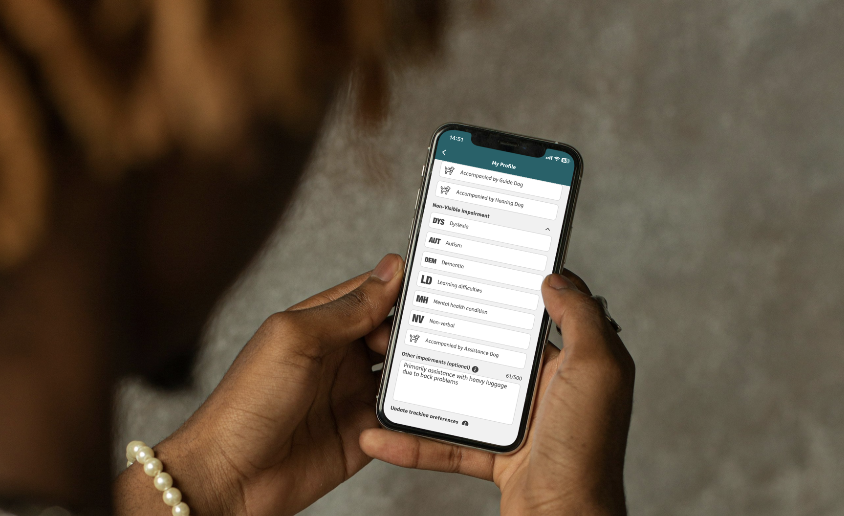
The Passenger Assistance app lets you request train assistance in a few steps.
You can set up your profile, choose your journey and share the support you need.
Your request is then sent to the train operator. Once it has been confirmed, you will receive a notification.
1. Set up your profile
The first step is to create your Passenger Assistance profile.
You can add your contact details and share your access considerations.
You decide how much detail to include.
Your profile can help make future requests quicker. It means you do not need to share the same information every time you request assistance.
You can update your profile whenever you need to.
2. Share your journey details
Next, choose your train journey in the app.
Add where you are travelling from and where you are travelling to. You can also select the date and time of your train.
The app will show journey options, so you can choose the one that works best for you.
This helps the train company understand where support is needed during your journey.
3. Choose the support you need
Once you have selected your journey, you can choose the type of support you need.
You can also add notes for train staff.
This helps explain your access needs in your own words. It can also help staff understand what support has been requested before you arrive.
For example, you may want to share that you:
- need a ramp to board or leave the train
- need help changing trains
- are travelling with a mobility aid
- are travelling with an assistance dog
- need extra time to move through the station
- would like staff to explain where to go
Only share the details you feel comfortable sharing.
4. Send your Passenger Assistance request
After you have added your journey and support details, you can send your Passenger Assistance request.
Your request is sent to the train operator.
The train company will then confirm your assistance request. You will receive a notification when this happens.
You can view your request in the app and check the details before you travel.
Can I use the Passenger Assistance website?
Yes.
You can also request assistance through the Passenger Assistance website.
The website is useful if you prefer to use a browser or do not want to download the app.
However, the Passenger Assistance app is often the easiest option. It keeps your profile, journey details and assistance requests in one place.
The app can also make it quicker to request assistance again in the future.
Do I have to request Passenger Assistance before I travel?
No.
Everyone travels differently.
Some people prefer to request assistance before they travel. Some people use Turn Up and Go. Some people travel spontaneously. Others like to plan each step in advance.
All of these choices are valid.
Passenger Assistance is there if planning ahead helps you feel more prepared. It gives you another way to share your access needs and request support for your journey.
It does not replace your right to Turn Up and Go.
How Passenger Assistance can help
Passenger Assistance can help reduce some of the uncertainty around train travel.
It gives passengers a way to share information before they arrive at the station.
This can help if you want staff to know what support you have requested. It can also help if you do not want to explain your access needs for the first time on the day.
Accessible travel is not only about ramps, lifts and station facilities.
It is also about clear information, choice and confidence.
Passenger Assistance helps bring your request into one place, so your journey can feel clearer and more manageable.
Using Ask PA with Passenger Assistance
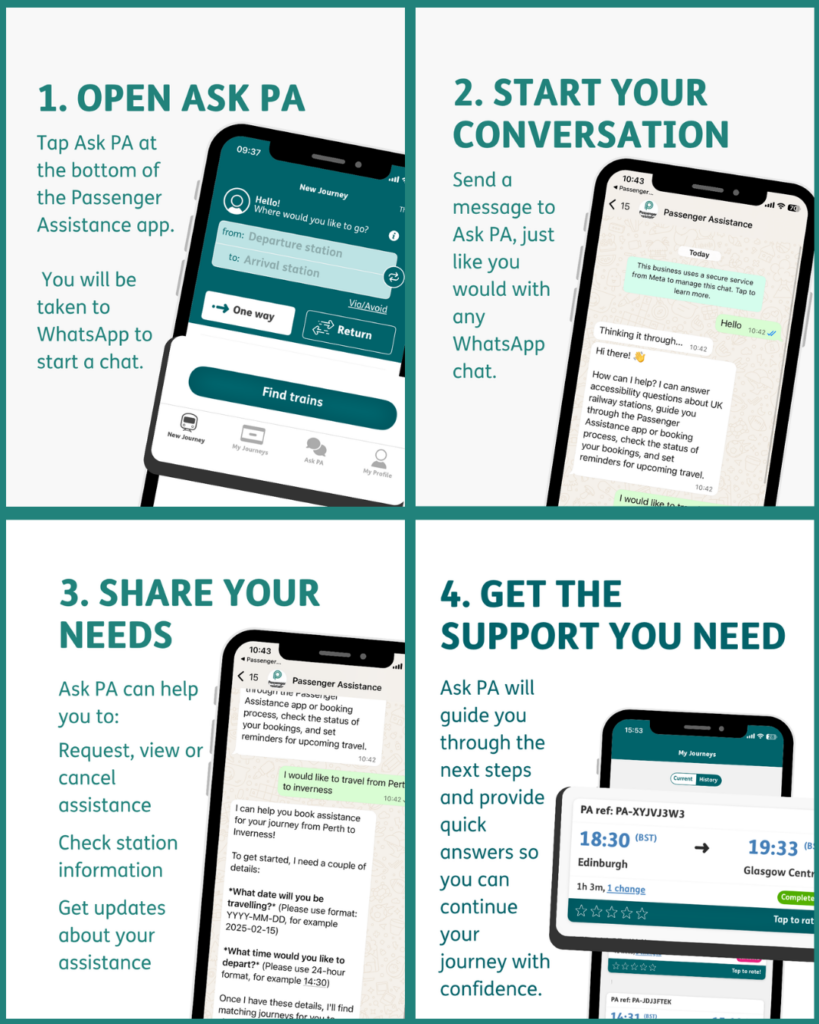
You can also use Ask PA, the Passenger Assistance WhatsApp service.
Ask PA can help you get quick answers while planning or travelling.
You can use Ask PA to check station accessibility information, manage your assistance request and get updates on the go.
Ask PA works alongside the Passenger Assistance app. Together, they can help you request support, check information and manage your journey more easily.
Start using Passenger Assistance
You can request assistance through the Passenger Assistance app or website.
The app is the easiest way to keep your profile, journey details and assistance requests in one place.
To request assistance for your next train journey, download the Passenger Assistance app or passengerassistance.com.